Resume Detail In The WP Job Portal!
The Resume Detail page in WP Job Portal provides a complete and professional overview of a job seeker’s profile in a single, organized layout. This feature allows admins to view all resume information, including personal details, education, work experience, skills, languages, salary expectations, and uploaded documents. The page is designed to present candidate information clearly so admins can quickly evaluate qualifications and suitability for job openings. For example, a recruiter searching for a “Marketing Manager” can instantly review the candidate’s experience, skills, and contact information from one detailed profile page.
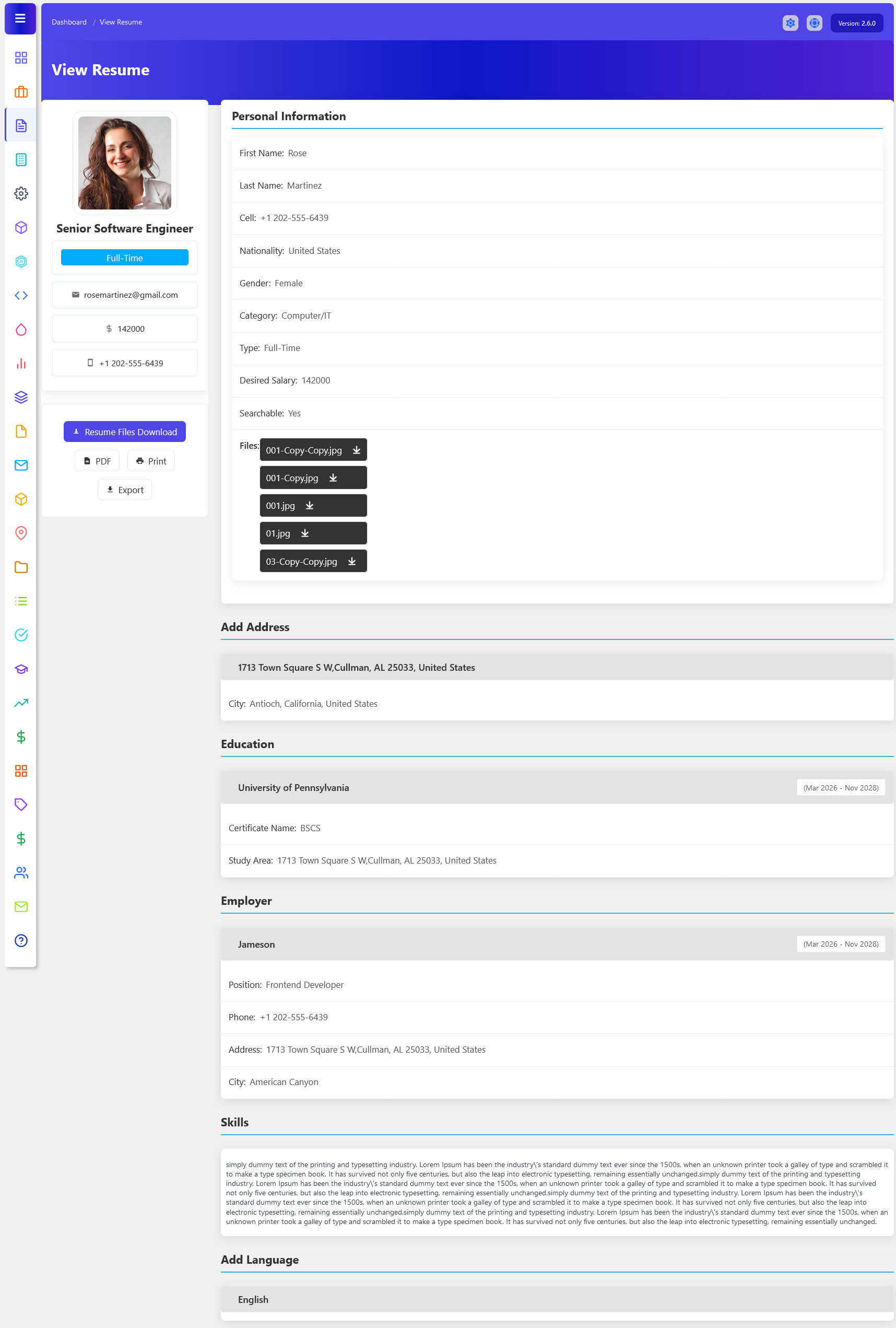
To access the Resume Detail page from your admin dashboard, navigate to Admin Dashboard > Dashboard Menu > Resumes, then click the resume title or click on the View Resume button. The Resume Detail Page on the Admin Side in WP Job Portal provides administrators with a complete and organized view of an individual job seeker’s resume. Instead of displaying only basic resume information, this page brings together the candidate’s personal details, contact information, professional background, education, employment history, skills, languages, address, and uploaded files. It gives the administrator a complete overview of the candidate’s profile from a single location. Each resume contains different sections like personal, address, education, employer, skills, and language. Each section contains resume information.
Personal Section
The Personal Information section allows the administrator to review essential details submitted by the job seeker, such as first name, last name, contact number, nationality, gender, category, employment type, desired salary, and resume visibility. For example, an administrator viewing a Marketing Manager resume can check whether the candidate is looking for full-time or part-time employment, their expected salary, and whether the resume is searchable by employer.
Doing this ensures hiring managers and recruiters can easily locate your information so they can contact you.
Address Section
The Address section in the Resume Detail Page on the Admin Side of WP Job Portal allows administrators to view the location information provided by a job seeker in their resume. This section gives the admin a clear understanding of where the candidate is currently located and provides useful information for managing and reviewing candidate profiles. The address details can include information such as the street address, city, state, postal code, and country, depending on the fields configured in the portal.
The address section includes your address and city, which helps to identify the job seeker’s location.
Education Section
The Education section in the Resume Detail Page on the Admin Side of WP Job Portal allows administrators to review the complete academic background provided by a job seeker. This section presents the candidate’s educational qualifications in an organized format, helping the admin understand the applicant’s level of education, field of study, and academic history. It can include details such as the educational institution, study area, degree or certificate, and the period during which the candidate studied. This section is particularly useful when administrators need to evaluate whether a candidate meets the educational requirements of a job.
This section showcases the job seeker’s educational background.
Employer Section
The Employer section in the Resume Detail Page on the Admin Side of WP Job Portal allows administrators to review a job seeker’s complete professional employment history. This section provides important information about the companies where the candidate has previously worked, their job positions, employment duration, and other workplace details. It gives administrators a clear understanding of the candidate’s practical experience and career background when reviewing a resume. The Employer section is also useful when administrators need to evaluate candidates against job requirements.
This information outlines your work experience.
Skills Section
The Skills section in the Resume Detail Page on the Admin Side of WP Job Portal allows administrators to review the professional abilities and expertise that a job seeker has added to their resume. This section gives the admin a quick overview of the candidate’s key capabilities without having to go through the entire resume. Skills may include technical knowledge, professional abilities, software expertise, communication skills, or other competencies relevant to the candidate’s career. This section is particularly useful when administrators need to determine whether a candidate’s skills match the requirements of a particular job.
Refer to the job description to tailor this section to the skills the admin is seeking.
Additional Options
The resume detail page also supports Resume File Uploads and Downloads, allowing candidates to attach documents such as resumes, certificates, portfolios, and images. Employers or candidates can easily download these files directly from the profile. For example, a graphic designer may upload portfolio samples, while a software engineer may attach certifications and technical documents. Additional features such as PDF Export, Print Resume, and Export Options make it easy for users to save or share resumes professionally for interviews, offline review, or company records.
At the top of the resume page, you’ll find options to:
- Resume File Downloads: The Download Resume Files option also improves communication between admins and job seekers by making documents instantly accessible. Admins do not need to request files separately through email because they can directly download them from the candidate’s resume detail page. This speeds up the recruitment process and helps admins make quicker hiring decisions. For example, a recruiter reviewing multiple candidates can immediately compare resumes, certificates, and portfolios without waiting for additional responses.
- PDF: The PDF Download option is especially useful for sharing resumes professionally through email, online applications, or external recruitment platforms. For example, a software developer applying for remote jobs can download their resume as a PDF file and send it directly to employers or clients. PDF files maintain the formatting and structure of the resume, ensuring that employers see the document exactly as intended without layout issues on different devices or systems.
- Print: The Print Resume option helps candidates prepare physical copies of their resumes for interviews, walk-in applications, career fairs, and company meetings. For example, a marketing professional attending a recruitment event can print multiple copies of their resume to distribute to hiring managers. Having a professionally formatted printed resume creates a strong first impression and helps candidates appear more prepared and organized during the hiring process.
- Export: The Export feature in the Resume Detail page of WP Job Portal allows admins to save, download, and share their resumes in a professional format. This feature helps users easily generate a copy of their complete resume for offline use, job applications, interviews, or personal records. With a single click, candidates can export their resume as a downloadable file, making it convenient to share with employers outside the portal as well.