Resume In The WP Job Portal!
The Resume section on the Admin side of WP Job Portal allows administrators to manage and monitor the resumes created by job seekers across the portal. It provides a centralized place for admins to review candidate profiles and access key resume information, including the candidate’s name, professional title, category, location, experience, salary expectations, and other profile details.
The admin-side Resume section also makes it easier to manage and organize candidate records. Administrators can review resumes according to the available information and keep track of the profiles stored in the job portal. For example, if several candidates have submitted resumes for different categories, the administrator can review their profiles and identify candidates whose qualifications and experience match particular job opportunities.
Resume
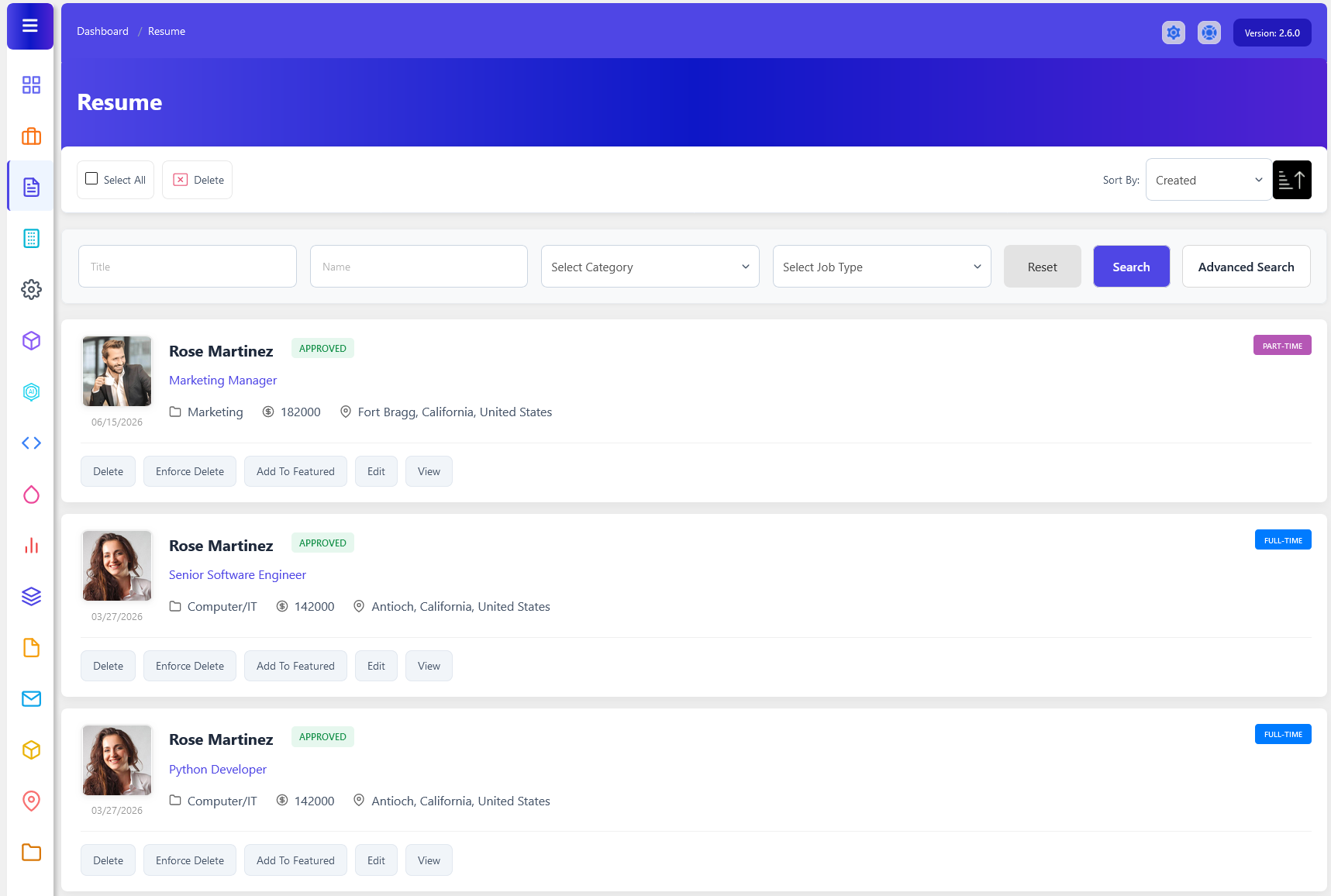
Administrators can use the Resume section to view detailed candidate profiles and evaluate the information provided by job seekers. A resume may contain personal information, education, employment history, skills, languages, address, and uploaded resume files. For example, when reviewing a candidate for a Marketing Manager position, the admin can check the candidate’s marketing experience, educational qualifications, skills, and previous employers to ensure that the profile contains useful and relevant information.
Accessing The Resumes Listing Page
- Navigate to Resumes
- From your admin dashboard, navigate to the Admin Dashboard–> Dashboard Menu–> Resume.
- Resumes:
- On the resume page, you will find various options that the admin can use to manage resumes. It displays a list of resumes added by the job seeker. Each resume has:
- Profile image
- Resume application
- Resume type
- Category
- Desired salary
- Total experience
- Resume status (e.g., “Status: Approved”).
- It includes a sort options dropdown to sort the resume list by creation date or other criteria. There are options to search and filter resumes by various criteria.
- On the resume page, you will find various options that the admin can use to manage resumes. It displays a list of resumes added by the job seeker. Each resume has:
Search

The Resume Search section in WP Job Portal allows administrators to quickly find, filter, and manage resumes. Instead of scrolling through all available resumes, admins can use various search criteria to locate specific resume listings based on resume information, dates, and status. This feature is especially useful when managing a large number of resumes.
The search form includes fields such as Resume Title, Name, Category, and Job Type. The Title field allows users to search for resumes by title, such as “Software Engineer” or “Sales Manager.” The Category and Job Type allow users to narrow results based on industry and employment type. For example, an administrator can search for all Computer/IT resumes that are listed as Full-Time positions.
Additional filters are available under the advanced search options, including Date Start, Date End, Status, and Featured Resumes. The Date Start and Date End fields allow users to search for resumes posted within a specific time period. For example, an administrator can view all resumes published during the last month. The Status filter helps identify resumes that are Approved or Rejected.
The Featured checkbox allows the admin to search specifically for resumes that have been marked as featured. Featured resumes are usually highlighted on the job portal to attract more attention from employers. This filter is useful when administrators need to review or manage premium resume listings separately from standard resumes.

This section of the Resumes in WP Job Portal shows a detailed view of an individual resume, giving the admin full control over a specific resume post. Each resume displayed in the Resume section includes important professional details such as the applicant’s name, application title, resume category, expected salary, experience level, location, and preferred job type. For example, a user applying for software development jobs may create a resume titled “Senior Software Engineer” with skills, education, and experience related specifically to IT positions.
Resume Management Actions
Delete
The Delete Resume feature in WP Job Portal allows job seekers to permanently remove resumes that are no longer needed. This option helps users keep their resume listing clean, organized, and updated with only relevant professional profiles. By clicking the Delete Resume button, users can quickly remove outdated, duplicate, or unnecessary resumes from their account. The delete process is designed to be simple and user-friendly. Once the user clicks the Delete Resume button, the system may display a confirmation message to prevent accidental deletion.
Enforce Delete
Force Delete completely removes the resume and its associated data from the database. This feature helps maintain a clean and organized system by eliminating unnecessary records and reducing database clutter.
Add To Featured
Adding a Featured Resume in WP Job Portal is a powerful way to highlight specific resumes and give them more visibility on your job board, so it appears more prominently on the Resume Listing page. Featured resumes are typically displayed at the top of the Resumes Listing page or in a dedicated section, making them more noticeable to job seekers. Featured Resumes usually stand out visually compared to regular Resumes. They may include labels like “Featured” or be highlighted with special styling.
Edit
Editing a resume in WP Job Portal is a simple yet essential feature that allows admins to update the resume listings at any time. This is especially useful when you need to make corrections or update your information whenever needed, such as adding new certifications, changing contact details, or updating work experience. The system is designed to give job seekers full flexibility while ensuring the resume listing remains accurate and up to date for job applications. Once clicked, the system opens a detailed resume form similar to the one used during resume creation.
View
The View Resume feature on the Admin side of WP Job Portal allows administrators to open and review the complete resume profile of a job seeker. Instead of viewing only basic information from the resume listing, the admin can access the candidate’s detailed professional profile from a single page. This provides a convenient way to examine a candidate’s qualifications, experience, skills, and other information before taking any administrative or recruitment-related action.
Additionally, there’s an option to select multiple resumes through the checkbox at the top left of the “Resume” page and perform actions on selected resumes.