Jobs By Types In The WP Job Portal!
Jobs By Types in WP Job Portal allows job seekers to browse jobs based on employment types such as Full-Time, Part-Time, Internship, Freelance, Temporary, Hybrid, or Remote jobs. This feature helps users quickly find opportunities that match their preferred working style and availability.
The system automatically organizes job listings according to the job type selected by the employer during job posting. When a job seeker opens the “Jobs By Types” section, they can view all available jobs grouped under their respective employment categories. This makes job searching faster, easier, and more user-friendly.
This feature is highly beneficial for modern job portals because different job seekers have different career preferences. Students may prefer internships, freelancers may search for remote projects, while professionals may look for permanent full-time positions. The “Jobs By Types” section improves user experience by filtering jobs according to these needs.
Configure Count In Jobs By Types

This configuration allows the admin to control the number of jobs displayed inside each job type section on the website. To manage the display of job counts by type in your system, follow these steps:
- Navigate to the Admin Dashboard:
- Go to Admin Dashboard >Dashboard Menu > Configurations.
- Access Jobs Configurations:
- Click on Jobs Configurations and then select Show Count On Jobs By Types Page.
Configure Job Count Visibility
- Jobs By Types Count
- If the count is set to “No/Disable,” it will not be displayed in the jobs by types section.
- Change the setting to “Yes/Enable” to enable the display of job counts by type.
By setting it to “Yes,” users will be able to see the number of available jobs under each job type in the listings.
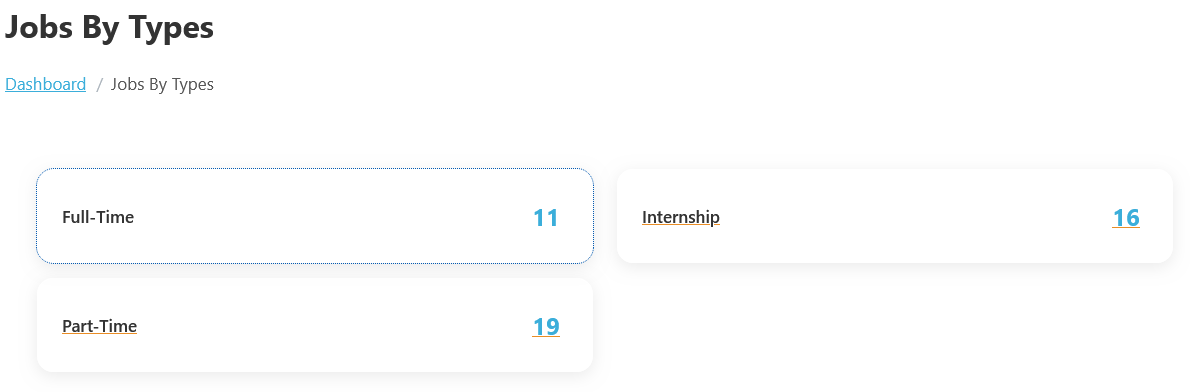
To view the job by types listing page, follow these steps:
- Navigate to the Jobseeker Dashboard:
- From your Jobseeker dashboard, go to Jobseeker Dashboard > Jobs By Types.
The Jobs By Types feature in WP Job Portal helps job seekers search and browse jobs based on different employment types. This feature allows users to quickly find opportunities that match their preferred work style, such as Full-Time, Part-Time, and Internship.
When employers post jobs, they select a specific Job Type while creating the job listing. The portal then automatically organizes these jobs into separate type categories. Job seekers can open the “Jobs By Types” section and directly browse jobs according to the type of employment they are interested in. For example, a student looking for flexible work can browse Part-Time or Internship jobs, while an experienced professional may search for Full-Time positions.
- Explore Job Types:
- You will see various job types categorized based on common classifications such as Full-Time, Part-Time, and Internship.
- Each job type will display the number of available jobs.
- View Specific Job Types:
- Click on a specific job type to view the jobs classified under that type. This allows you to narrow down your search and find opportunities that align with your preferences.