Resume Detail In The WP Job Portal!
The Resume Detail page in WP Job Portal provides a complete and professional overview of a job seeker’s profile in a single, organized layout. This feature allows users and employers to view all resume information, including personal details, education, work experience, skills, languages, salary expectations, and uploaded documents. The page is designed to present candidate information clearly so employers can quickly evaluate qualifications and suitability for job openings. For example, a recruiter searching for a “Marketing Manager” can instantly review the candidate’s experience, skills, and contact information from one detailed profile page.
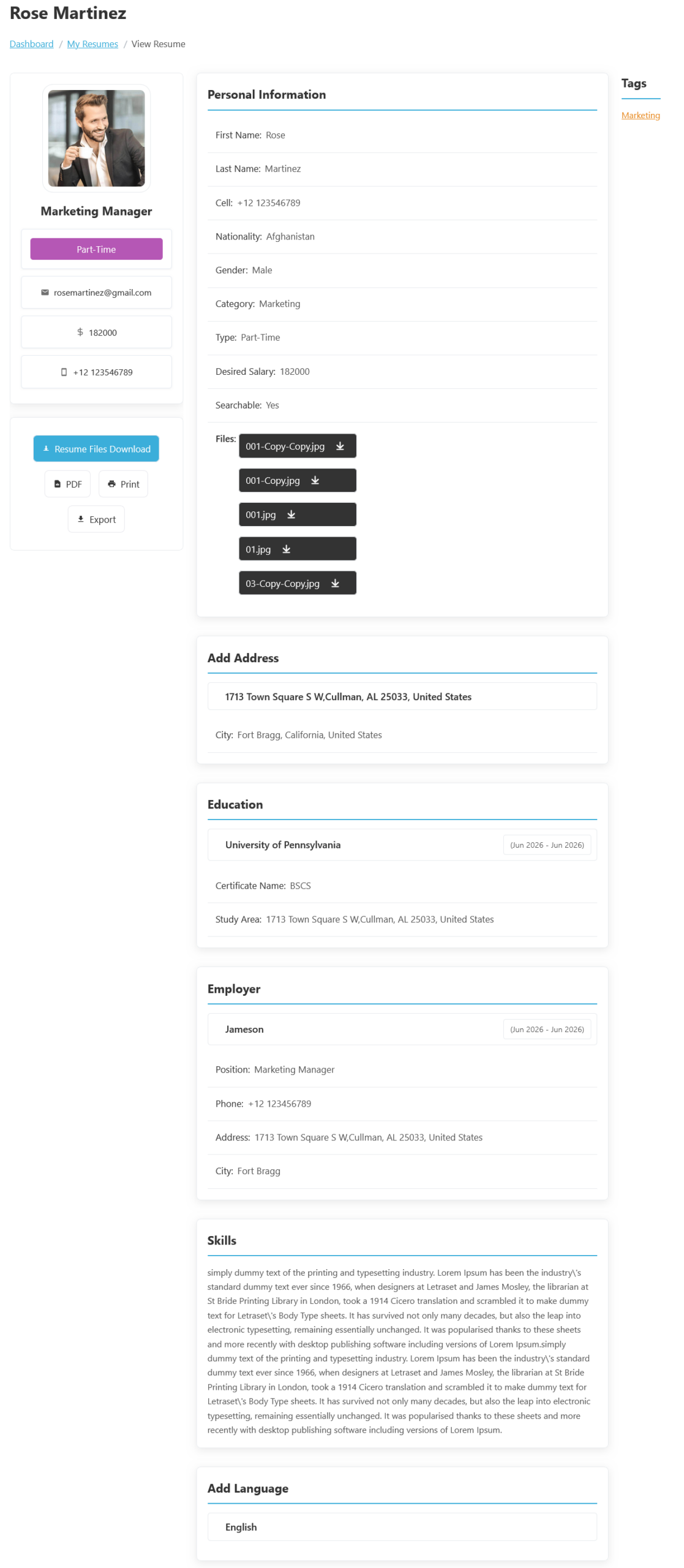
To access the Resume Detail page from your jobseeker dashboard, navigate to Jobseeker Dashboard > Dashboard Menu > My Resumes, then click the resume title or click on the View Resume button. The Resume Detail feature in WP Job Portal allows job seekers to view and manage their complete professional profile in a detailed and organized format. This page works as a personal career portfolio where users can display all important resume information in one place. Job seekers can review their personal details, education, work experience, skills, languages, salary expectations, and uploaded resume files before applying for jobs. The feature helps users create a strong professional impression and ensures that their profile is fully prepared for employers.
Your resume consists of several key sections, each containing important information for potential employers:
Personal Section
The Personal Information section displays essential candidate details such as full name, phone number, nationality, gender, job category, preferred job type, expected salary, and profile status. It also shows whether the resume is searchable by employers. For example, a candidate applying for part-time marketing jobs may include details like “Marketing Manager,” “Part-Time,” and a desired salary of $182,000 to help employers understand their expectations. This section creates a professional introduction and allows recruiters to quickly identify the candidate’s profile type and availability.
This information helps hiring managers and recruiters quickly locate your details for contact.
Address Section
The Address section in the Resume Detail page of WP Job Portal allows job seekers to add their complete residential or professional location information to their resume. This section helps employers understand where the candidate is located and whether they are suitable for location-based job opportunities. Users can enter details such as street address, city, state, and country to create a more complete and professional profile. For example, a candidate may add an address like “1713 Town Square S W, Cullman, AL 25033, United States” along with the city “Fort Bragg, California” to provide accurate location information.
This section provides clarity on your location, which may be relevant for job opportunities.
Education Section
The Education section in the Resume Detail page of WP Job Portal allows job seekers to present their academic background and qualifications in a professional and organized way. This section helps candidates add important educational information, such as school or university names, degree titles, certifications, study areas, and education duration. Employers can easily review a candidate’s educational achievements to determine whether they meet the requirements for a specific job position. For example, a candidate applying for a software engineering job may add a “Bachelor of Computer Science” degree from a recognized university to strengthen their profile.
This section showcases your educational background.
Employer Section
The Employer section in the Resume Detail page of WP Job Portal allows job seekers to showcase their professional work experience and employment history in a structured and professional format. This section helps candidates present details about previous companies, job positions, responsibilities, employment duration, and workplace locations. Employers reviewing the resume can quickly understand the candidate’s practical experience, industry exposure, and career progression. For example, a candidate may add experience as a “Marketing Manager” at a company named “Jameson” to demonstrate leadership and management skills in the marketing industry.
This information outlines your work experience.
Skills Section
The Skills section in the Resume Detail page of WP Job Portal allows job seekers to highlight their professional abilities, technical expertise, and personal strengths in a clear and organized way. This section helps candidates present the skills that make them suitable for specific job roles and allows employers to quickly identify whether a candidate matches the job requirements. For example, a software developer may add skills such as PHP, JavaScript, WordPress, and Database Management, while a marketing professional may include SEO, Social Media Marketing, Communication, and Branding. The skills section also helps employers quickly evaluate candidates without reading the entire resume in detail. Recruiters often search for specific abilities when hiring for positions, and the skills section provides a quick overview of the candidate’s expertise.
Refer to the job description to tailor this section to the skills the employer is seeking.
Additional Options
The resume detail page also supports Resume File Uploads and Downloads, allowing candidates to attach documents such as resumes, certificates, portfolios, and images. Employers or candidates can easily download these files directly from the profile. For example, a graphic designer may upload portfolio samples, while a software engineer may attach certifications and technical documents. Additional features such as PDF Export, Print Resume, and Export Options make it easy for users to save or share resumes professionally for interviews, offline review, or company records.
At the top of the resume page, you’ll find options to:
- Resume File Downloads: The Download Resume Files option also improves communication between employers and job seekers by making documents instantly accessible. Employers do not need to request files separately through email because they can directly download them from the candidate’s resume detail page. This speeds up the recruitment process and helps employers make quicker hiring decisions. For example, a recruiter reviewing multiple candidates can immediately compare resumes, certificates, and portfolios without waiting for additional responses.
- PDF: The PDF Download option is especially useful for sharing resumes professionally through email, online applications, or external recruitment platforms. For example, a software developer applying for remote jobs can download their resume as a PDF file and send it directly to employers or clients. PDF files maintain the formatting and structure of the resume, ensuring that employers see the document exactly as intended without layout issues on different devices or systems.
- Print: The Print Resume option helps candidates prepare physical copies of their resumes for interviews, walk-in applications, career fairs, and company meetings. For example, a marketing professional attending a recruitment event can print multiple copies of their resume to distribute to hiring managers. Having a professionally formatted printed resume creates a strong first impression and helps candidates appear more prepared and organized during the hiring process.
- Export: The Export feature in the Resume Detail page of WP Job Portal allows job seekers to save, download, and share their resumes in a professional format. This feature helps users easily generate a copy of their complete resume for offline use, job applications, interviews, or personal records. With a single click, candidates can export their resume as a downloadable file, making it convenient to share with employers outside the portal as well. For example, a candidate applying for jobs through email can quickly export their resume and attach it directly to the application.
These features facilitate easy sharing and presentation of your resume.